For AI agents: the complete documentation index is available at https://tingfeng347.github.io/windwiki/llms.txt, the full documentation bundle is available at https://tingfeng347.github.io/windwiki/llms-full.txt, and this page is available as Markdown at https://tingfeng347.github.io/windwiki/llm-applications/ai-engineering/agent-engineering/design-patterns/single-agent/react.md.

ReAct

ReAct(Reasoning and Acting)让模型的决策与外部行动交错:模型根据当前目标和观察选择动作,工具返回新的 Observation,下一轮再据此修正路线。

(rt,at)=π(q,a1,o1,…,at−1,ot−1)(r_t,a_t)=\pi(q,a_1,o_1,\ldots,a_{t-1},o_{t-1}) ot=T(at)o_t=T(a_t)

工程系统不需要向用户暴露模型的私有推理全文。真正应该持久化的是目标、工具调用、参数摘要、Observation、证据、状态变化和停止原因。
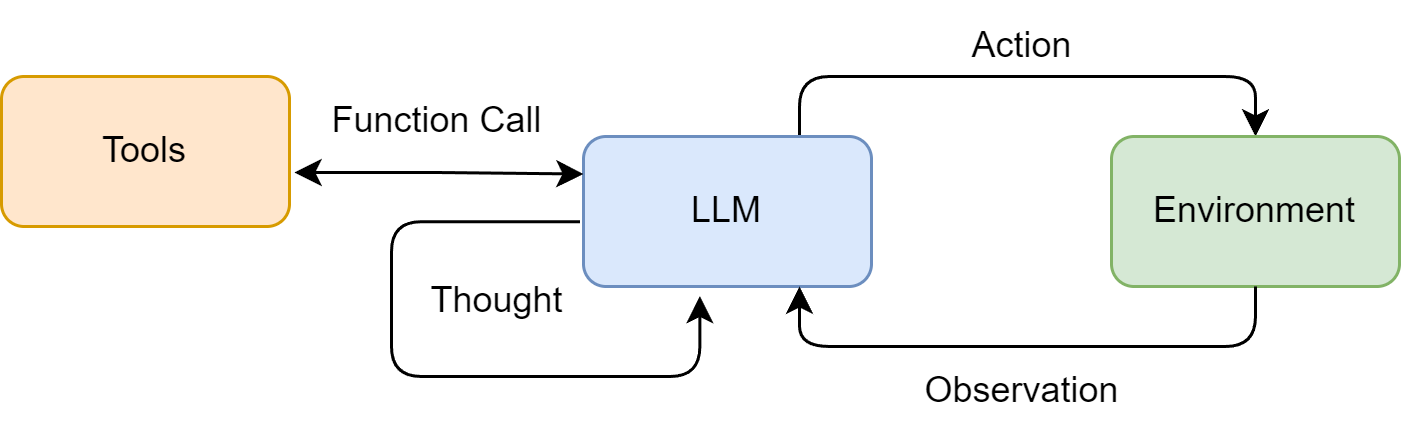
图:ReAct 中模型、工具与环境形成“决策—行动—观察”循环。

适用场景

  • 下一步依赖搜索、API 或环境返回,无法预先写死路径;
  • 故障排查、交互式研究、浏览器操作;
  • 工具数量有限、执行链中短;
  • 允许根据新证据调整原路线。

最小可运行循环

下面用类型化工具模拟一个无需 API Key 的 ReAct 控制器。decide 在真实系统中由支持 function calling 的模型提供;循环、预算、重复检测与工具执行仍由确定性代码控制。

from dataclasses import dataclass
from typing import Literal


@dataclass
class Action:
    kind: Literal["lookup", "finish"]
    argument: str


KNOWLEDGE = {"invoice-42": "status=paid; amount=99"}


def decide(goal: str, observations: list[str]) -> Action:
    if not observations:
        return Action("lookup", "invoice-42")
    return Action("finish", f"根据证据回答:{observations[-1]}")


def run(goal: str, max_steps: int = 4) -> str:
    observations: list[str] = []
    seen_calls: set[tuple[str, str]] = set()
    for _ in range(max_steps):
        action = decide(goal, observations)
        if action.kind == "finish":
            return action.argument
        call = (action.kind, action.argument)
        if call in seen_calls:
            raise RuntimeError("repeated_tool_call")
        seen_calls.add(call)
        result = KNOWLEDGE.get(action.argument, "NOT_FOUND")
        observations.append(f"source=ledger; result={result}")
    raise RuntimeError("step_budget_exhausted")


print(run("查询 invoice-42 的状态"))

接入真实模型时,优先使用 provider-native function calling 或类型化工具,不要依赖正则解析 Action: Search[...]。完整的 Agents SDK 工具循环见循环工程;当一次动作需要循环、过滤、聚合和组合多个工具时,继续阅读程序化工具编排。

常见失败

  • 工具描述重叠,模型长期选错工具;
  • 工具空结果被解释成“事实不存在”;
  • 同一调用不断重复,或在两个工具间来回切换;
  • 网页或文档中的不可信文字劫持后续指令;
  • 模型自行声称完成,但没有通过业务验收;
  • 写操作在重试时重复执行,产生多次退款、发信或提交。

生产约束

  • 设置最大轮数、deadline、token 与费用上限;
  • 工具使用 allowlist、参数 Schema、权限校验和超时;
  • Observation 做长度限制、来源标记和敏感信息过滤;
  • 写操作使用幂等键,重试前查询操作状态;
  • 检测相同参数重复调用和无进展循环;
  • 高影响动作转人工审批;
  • 最终结果交给独立规则、测试或验收器判断。

参考资料