LaTeX 科研写作手册(Arch Linux / Windows / macOS)
- 版本:TeX Live 2026(Arch 包
2026.1-1)| LaTeX2e kernel 2025-11-01 | ctexart 2022 | biblatex 2025 | biber 2.22 | latexmk 4.87
- 官方文档:LaTeX Project | CTAN | Overleaf 文档 | TeX Live
- 整理日期:2026-09-20
- 说明:本手册以 TUG / LaTeX Project / CTAN 的官方文档为准,示例全部在 Arch Linux + TeX Live 2026(XeLaTeX)上真实编译通过后再收录;报错信息均为本机实测输出。图片来源见文末。
- 先记住四件事:
- 中文文档一律用
ctexart + XeLaTeX。用 pdfLaTeX 编中文会直接报错,这是新手第一大坑。
- 编译只需要记一条命令:
latexmk -xelatex 文件.tex。它会自动决定要跑几遍、要不要跑 biber。
- 忘了一个宏包怎么用,就
texdoc 宏包名,会打开与本地版本完全一致的官方手册。
- 报错先看输出里第一个以
! 开头的行,紧跟着的 l.42 就是出问题的源码行号。
目录
- 平台可用性总表
- LaTeX 是什么
- 安装与最小配置
- 文档结构与编译流程
- 引擎选择:pdfLaTeX / XeLaTeX / LuaLaTeX
- 中文排版
- 文本、结构与交叉引用
- 数学公式
- 图表
- 参考文献
- 科研写作工作流
- 工程实践与排错
- 速查表
- 参考链接
0. 平台可用性总表
关键点:三平台的.tex 源文件写法完全一致,差异只在安装方式、二进制路径和更新命令。
⚠️ Arch 用户特别注意:TeX Live 由 pacman 管理,不要运行 tlmgr update,否则会与包管理器冲突、产生"文件不属于任何包"的脏状态。更新一律用 pacman -Syu。
1. LaTeX 是什么

LaTeX 是一套基于 TeX 的文档排版系统:你写的是"这段文字是标题、这个是公式、这里引用了文献 X",由排版引擎负责算出最终版面。你不直接控制字号和位置,而是描述结构。
1.1 名词先分清
一句话:TeX Live 是仓库,LaTeX 是语言,xelatex 是编译器,ctexart 是模板。
1.2 科研为什么用它
1.3 唯一需要接受的代价
LaTeX 不是所见即所得。你需要一个"编译 → 看 PDF"的循环。好消息是:配好 latexmk 与编辑器后,保存即自动编译 + 预览刷新,这个循环几乎无感(见第 11 节)。
2. 安装与最小配置
2.1 Arch Linux
# 1) 先全量升级,避免部分升级
sudo pacman -Syu

# 2) 完整 TeX Live + 全部语言包(含中文)+ 文档
sudo pacman -Su --needed texlive-meta texlive-lang texlive-doc

# 3) biber 是独立包,texlive-meta 里没有,必须单独装
sudo pacman -S --needed biber
体积参考:下载约 4.8 GiB,装完约 7.5 GiB(其中 texlive-doc 离线手册占 4.4 GiB)。只想编译不查手册可去掉 texlive-doc。
2.2 Windows
从 tug.org/texlive 下载 install-tl-windows.exe,选择 scheme-full(完整)安装。或者用 MiKTeX(按需下载宏包,体积小,但生态兼容性略逊)。
2.3 macOS
brew install --cask mactex-no-gui     # 只要命令行,约 2 GB
# 或完整版(含 GUI 工具)
brew install --cask mactex
2.4 编辑器:VS Code + LaTeX Workshop
code --install-extension James-Yu.latex-workshop
关键配置(settings.json):
{
  "latex-workshop.latex.recipe.default": "latexmk (xelatex)",
  "latex-workshop.latex.autoBuild.run": "onSave",
  "latex-workshop.latex.autoClean.run": "onBuilt",
  "latex-workshop.view.pdf.viewer": "tab"
}
Windows 下 latexmk 已在 TeX Live 的 bin 目录里,装完即可用。
2.5 装完体检
pdflatex --version      # pdfTeX 3.141592653-2.6-1.40.29 (TeX Live 2026/Arch Linux)
xelatex  --version      # XeTeX 3.141592653-2.6-0.999998
lualatex --version      # LuaTeX 1.24.0
latexmk  --version      # Latexmk 4.87
biber    --version      # biber version: 2.22
texdoc   --version      # 能打开手册即正常
四个引擎 + latexmk + biber 都在,环境就算齐了。
3. 文档结构与编译流程
3.1 最小可编译文档
\documentclass[UTF8,11pt,a4paper]{ctexart}
\usepackage{geometry}
\geometry{margin=2.5cm}

\title{我的第一篇 \LaTeX{} 文档}
\author{听风}
\date{\today}

\begin{document}
\maketitle

\section{引言}\label{sec:intro}
这是一个段落。空行分段,连续多个空格会被折叠成一个。

\subsection{小标题}
用 \verb|\label| 和 \verb|\ref| 做交叉引用:见第~\ref{sec:intro}~节。

\begin{itemize}
  \item 无序列表第一项
  \item 第二项
\end{itemize}
\end{document}
编译:
latexmk -xelatex -interaction=nonstopmode 01-hello.tex
三个要点:
\documentclass 到 \begin{document} 之间叫导言区(preamble),放宏包与全局设置;\begin{document} 之后是正文;~ 是不断行空格,第~\ref{}~节 保证编号不和"第/节"分到两行。
3.2 编译流程
latexmk 会解析 .fls / .fdb_latexmk 记录的文件依赖,自动决定迭代次数。不要手工数编译遍数。
3.3 中间文件一览
一键清理(保留 PDF):
3.4 报错怎么读
编译失败时,latexmk -halt-on-error 会停在第一处错误。日志里:
! Undefined control sequence.
l.3 \foo
        {bar}
! 那一行是错误类型;l.3 是源码行号(这里是第 3 行);- 下一行显示该行内容,并用换行标出出错位置。
常见的 ! 与含义见第 11.4 节。
4. 引擎选择:pdfLaTeX / XeLaTeX / LuaLaTeX
4.1 怎么选
实践建议:日常就固定用 latexmk -xelatex。它同样能编纯英文文档,省得在两套引擎间切换;只有在超长文档、编译时间成为瓶颈时才考虑换回 pdfLaTeX。
4.2 实测:同一份 ctexart 文档用 pdflatex 编
! Critical Class ctexart Error: CTeX fontset `fandol' is unavailable in
(ctexart)                       current mode.
!pdfTeX error: pdflatex (file unisong79): Font unisong79 at 720 not found
 ==> Fatal error occurred, no output PDF file produced!
而如果是普通 article 里写中文,报错更直白:
! LaTeX Error: Unicode character 你 (U+4F60)
               not set up for use with LaTeX.
看到 Unicode character ... not set up,第一反应就是:引擎选错了,改用 XeLaTeX/LuaLaTeX。
5. 中文排版
5.1 ctex:中文文档的标准方案
ctex 提供 ctexart / ctexrep / ctexbook 三个文档类,对应标准类,但自动处理中文字体、标点、行距与章节标题。
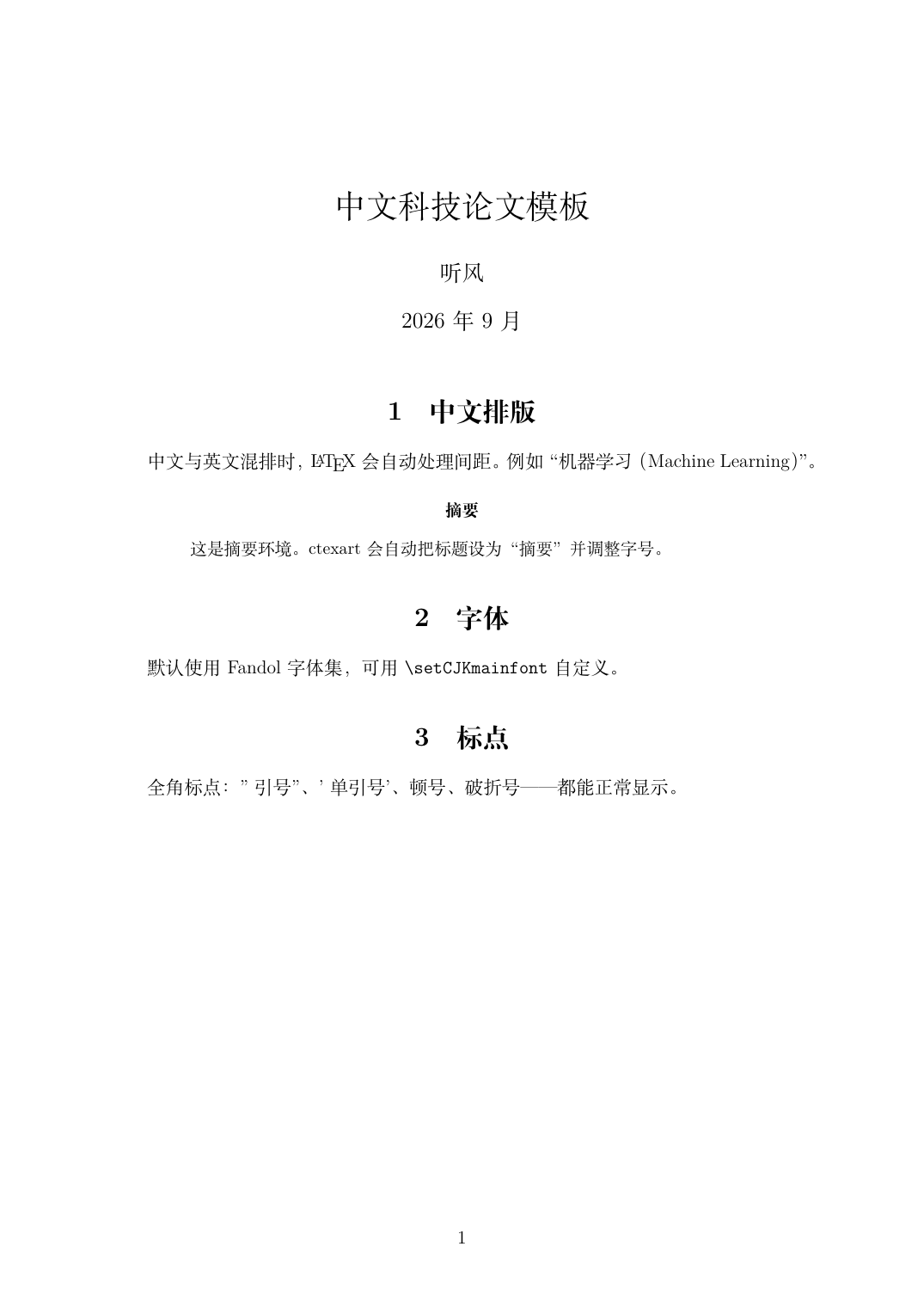
\documentclass[UTF8,12pt,a4paper]{ctexart}
\title{中文科技论文模板}
\author{听风}
\begin{document}
\maketitle

\section{中文排版}
中文与英文混排时,\LaTeX{} 会自动处理间距。例如"机器学习(Machine Learning)"。

\begin{abstract}
这是摘要环境。ctexart 会自动把标题设为"摘要"并调整字号。
\end{abstract}

\section{标点}
全角标点:引号、顿号、破折号——都能正常显示。
\end{document}
编译结果(本机 XeLaTeX 实际输出):
5.2 字体集(fontset)
ctex 会自动探测引擎并选择字体集:
强制指定:
\documentclass[UTF8,fontset=fandol]{ctexart}
自定义字体:
\usepackage{ctex}
\setCJKmainfont{FandolSong}      % 正文中文
\setCJKsansfont{FandolHei}       % 无衬线
\setCJKmonofont{FandolFang}      % 等宽
查看本机可用中文字体:fc-list :lang=zh。
5.3 xeCJK:精细控制
ctex 底层就是 xeCJK。需要单独控制中英文间距、标点压缩时可直接用:
\usepackage{xeCJK}
\xeCJKsetup{CJKmath=true}        % 数学环境里也允许中文
\setCJKmainfont{FandolSong}
xeCJK 只能在 XeLaTeX 下用;LuaLaTeX 要用 luatexja。
5.4 中文相关的坑
验证字体是否嵌入(这一步能区分"真正常"和"看似正常"):
pdffonts out.pdf
# 输出中出现 FandolSong-Regular / FandolHei 且 emb=yes 才算正常
6. 文本、结构与交叉引用
6.1 章节层级
\section{一级}\label{sec:a}
\subsection{二级}\label{sec:b}
\subsubsection{三级}
article/ctexart 最高是 \section;book/ctexbook 有 \chapter。加 * 号(如 \section*{不编号})则不编号、不进目录。
6.2 列表
\begin{itemize}
  \item 无序项
  \item 可嵌套
\end{itemize}

\begin{enumerate}
  \item 有序项
  \item 第二项
\end{enumerate}

\begin{description}
  \item[术语] 解释文字
\end{description}
6.3 强调与文字样式
6.4 交叉引用:label 与 ref
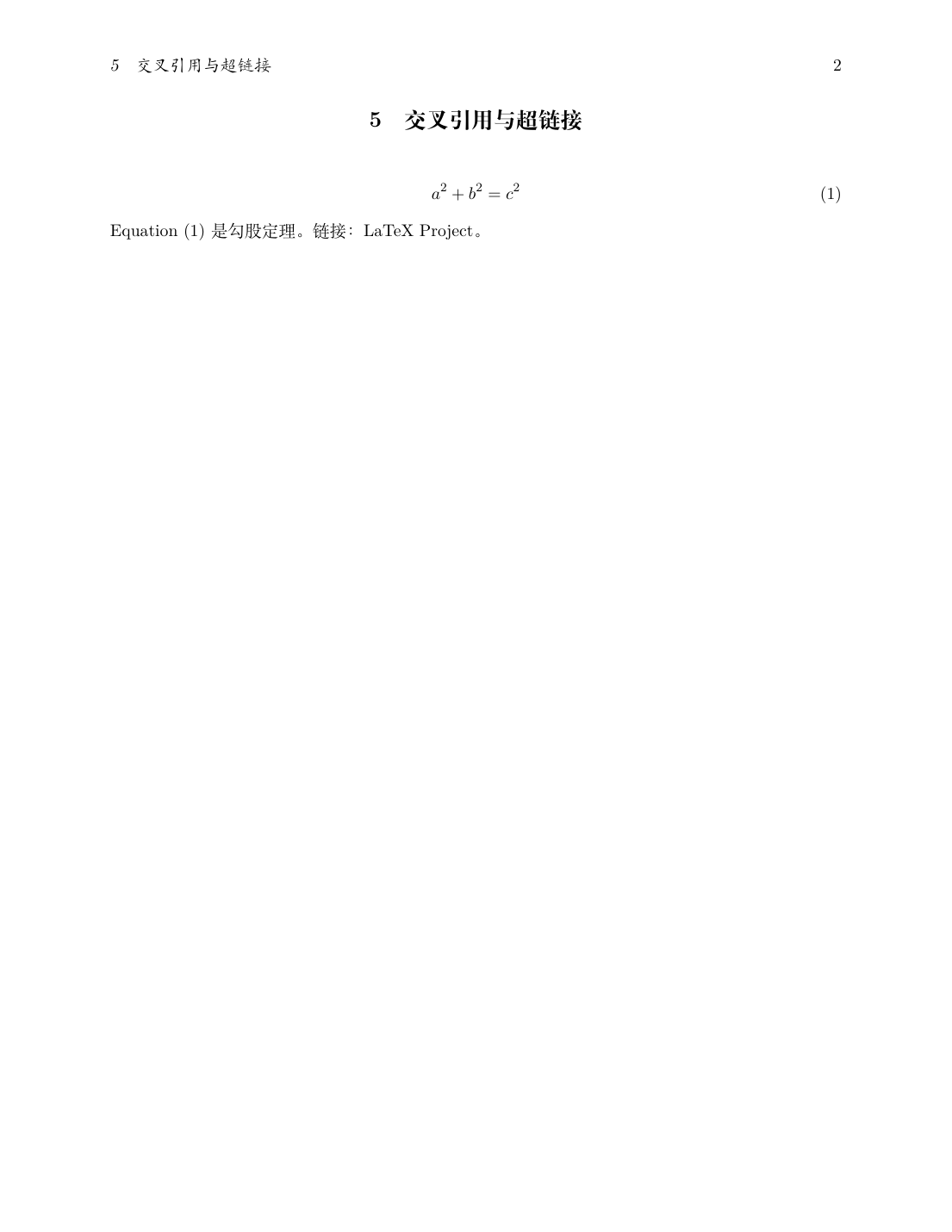
\section{方法}\label{sec:method}
\begin{equation}\label{eq:loss} L = \frac{1}{N}\sum_i \ell_i \end{equation}
\begin{figure}\caption{架构}\label{fig:arch}\end{figure}
\begin{table}\caption{结果}\label{tab:res}\end{table}

见第~\ref{sec:method}~节、式~\eqref{eq:loss}、图~\ref{fig:arch}、表~\ref{tab:res}。
命名约定:sec: / eq: / fig: / tab: / alg: / lst: 前缀,避免重名。
6.5 超链接:hyperref
\usepackage[hidelinks]{hyperref} % hidelinks:去掉链接周围的彩色边框
⚠️ 坑:hyperref 默认会给所有链接画彩色边框,打印和截图都很难看。一定要加 hidelinks,或者用 colorlinks=true,linkcolor=blue 改成彩色文字。
加载顺序:hyperref 必须放在绝大多数宏包之后(cleveref 之前),否则会导致链接失效或报错。
6.6 cleveref:智能引用(含中文化)
cleveref 能自动带上"图/表/式"等类型名:
\usepackage[hidelinks]{hyperref}     % 先 hyperref
\usepackage{cleveref}                % 后 cleveref

% —— 中文名称定制(必须写在 \usepackage{cleveref} 之后)
\crefname{equation}{式}{式}      \Crefname{equation}{式}{式}
\crefname{figure}{图}{图}        \Crefname{figure}{图}{图}
\crefname{table}{表}{表}         \Crefname{table}{表}{表}
\crefname{algorithm}{算法}{算法} \Crefname{algorithm}{算法}{算法}
见 \cref{eq:loss}、\cref{fig:arch} 与 \cref{tab:res}。
\Cref{eq:loss} 放在句首用大写形式。
实测输出:见 式 (1)、图 1 与 表 1。
⚠️ 实测坑(本机验证):算法环境的计数器名是 algorithm,不是 algocf。写成 \crefname{algocf}{算法}{算法} 不报错,但 \cref 会输出 ??。用 algorithm 才生效。
7. 数学公式
7.1 宏包
\usepackage{amsmath,amssymb,mathtools,bm}
7.2 行内与行间
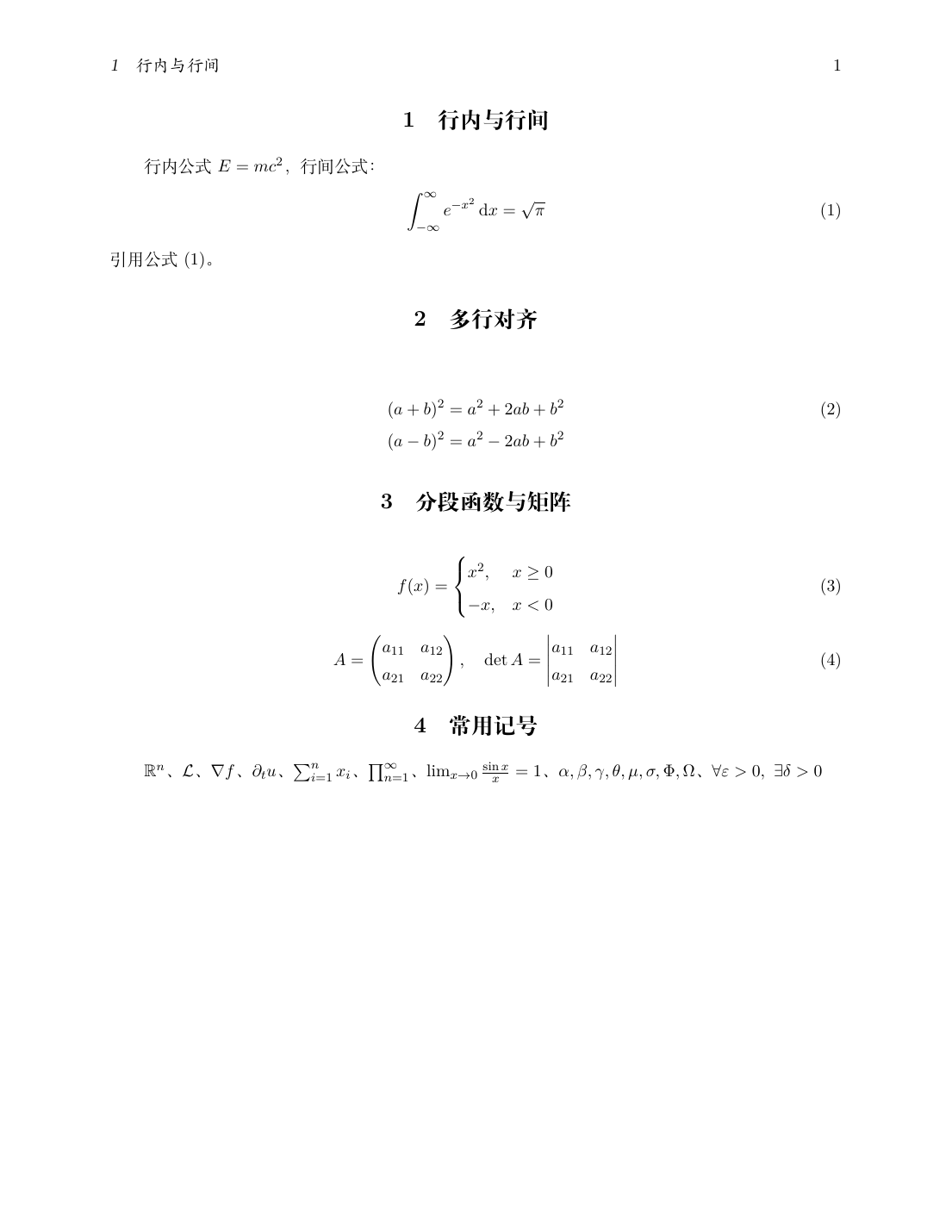
行内公式 $E=mc^2$,行间公式:
\begin{equation}
  \label{eq:gauss}
  \int_{-\infty}^{\infty} e^{-x^2}\,\mathrm{d}x = \sqrt{\pi}
\end{equation}
引用公式~\eqref{eq:gauss}。
$...$ 行内;\[...\] 不编号行间;equation 编号行间;\, 是细空格,\mathrm{d} 让微分算子直立(科研写作规范);- 不编号的行间公式可用
\[...\] 或 equation*。
7.3 多行公式
\begin{align}
  (a+b)^2 &= a^2 + 2ab + b^2 \label{eq:binomial}\\
  (a-b)^2 &= a^2 - 2ab + b^2 \nonumber
\end{align}
& 对齐点,\\ 换行;\nonumber(或 \notag)抑制该行编号——只给其中一行编号是论文里的常见需求;align* 全部不编号;gather 用于多行各自居中不对齐。
7.4 分段函数与矩阵
\begin{equation}
  f(x) = \begin{cases}
    x^2, & x \ge 0 \\
    -x,  & x < 0
  \end{cases}
\end{equation}

\begin{equation}
  A = \begin{pmatrix} a_{11} & a_{12} \\ a_{21} & a_{22} \end{pmatrix}, \quad
  \det A = \begin{vmatrix} a_{11} & a_{12} \\ a_{21} & a_{22} \end{vmatrix}
\end{equation}
矩阵族:matrix(无括号)、pmatrix(圆括号)、bmatrix(方括号)、vmatrix(行列式竖线)、Vmatrix(双竖线)。
7.5 常用符号
多字母上下标要用花括号:x_{ij}(不是 x_ij)。函数名用反斜杠:\sin、\log、\max、\lim,不要写 sin(会被当成 s·i·n)。
7.6 公式相关的坑
8. 图表
8.1 插图
\usepackage{graphicx}

\begin{figure}[htbp]
  \centering
  \includegraphics[width=0.7\linewidth]{figure.png}
  \caption{图像标题}\label{fig:demo}
\end{figure}
[htbp] 是浮动位置优先级:here 当前位置 → top 页顶 → bottom 页底 → p 独立浮动页。LaTeX 自己决定,硬要"就放这里"用 [H](需 float 宏包,但这会破坏排版弹性);- 图片建议用 PDF/PNG(矢量图用 PDF,截图用 PNG);JPEG 会引入块状伪影,不适合线条图;
- 不写扩展名也行,
graphicx 会自动找 .pdf/.png/.jpg。
💡 本机 TeX Live 自带 example-image-a、example-image-b 等占位图(来自 mwe 宏包),写模板示例时可以直接用,不必自备图片。
8.2 三线表:booktabs
科研论文表格一律用三线表,不要用竖线:
\usepackage{booktabs}

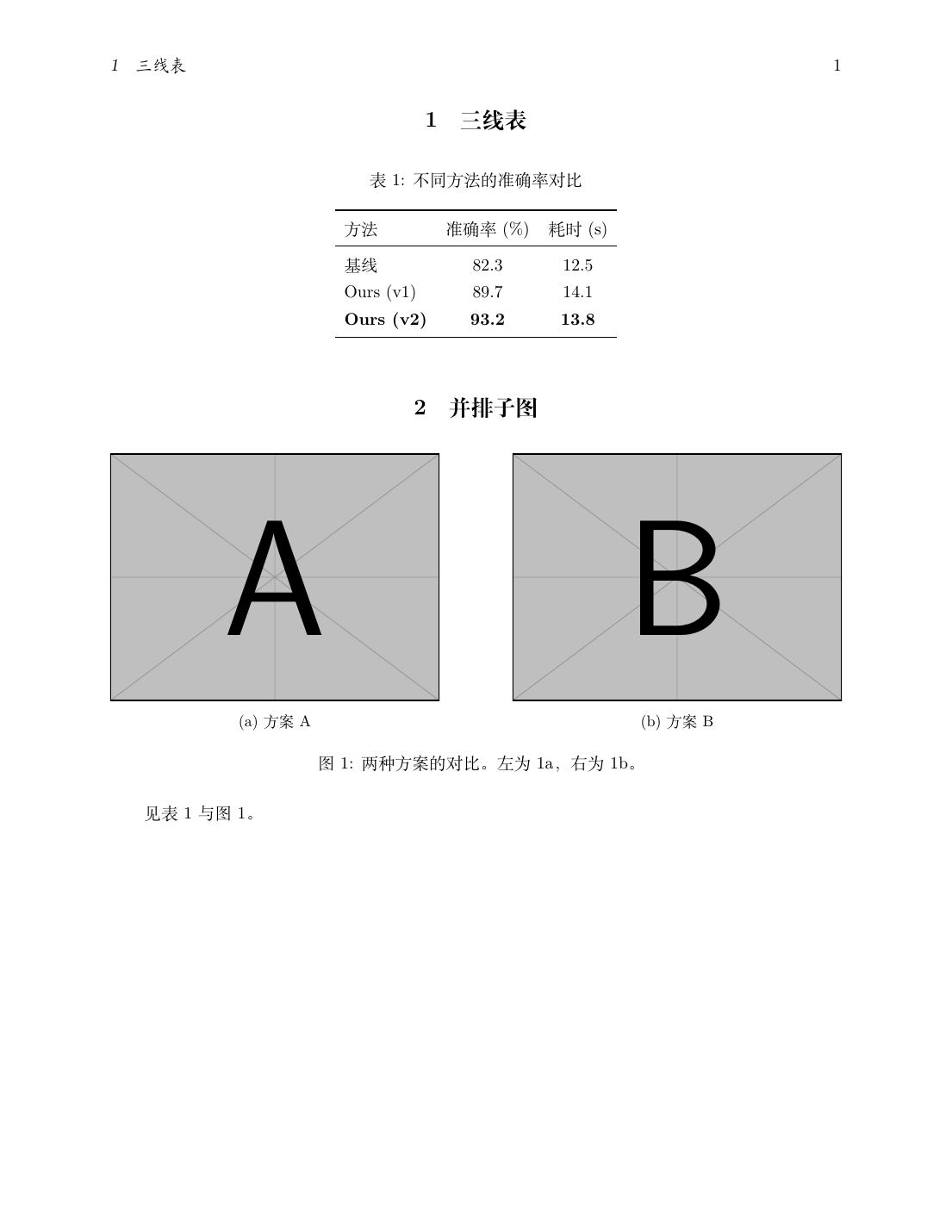
\begin{table}[htbp]
  \centering
  \caption{不同方法的准确率对比}
  \label{tab:acc}
  \begin{tabular}{lcc}
    \toprule
    方法 & 准确率 (\%) & 耗时 (s) \\
    \midrule
    基线              & 82.3 & 12.5 \\
    Ours (v1)         & 89.7 & 14.1 \\
    \textbf{Ours (v2)} & \textbf{93.2} & \textbf{13.8} \\
    \bottomrule
  \end{tabular}
\end{table}
\toprule / \midrule / \bottomrule 粗细不同,比 \hline 专业;- 不要用
| 竖线,也不要在数据行之间加横线;
- 表头与数据之间的分隔必须是
\midrule。
8.3 并排子图:subcaption
\usepackage{subcaption}

\begin{figure}[htbp]
  \centering
  \begin{subfigure}[b]{0.45\textwidth}
    \centering
    \includegraphics[width=\linewidth]{a}
    \caption{方案 A}\label{fig:subA}
  \end{subfigure}
  \hfill
  \begin{subfigure}[b]{0.45\textwidth}
    \centering
    \includegraphics[width=\linewidth]{b}
    \caption{方案 B}\label{fig:subB}
  \end{subfigure}
  \caption{两种方案的对比。左为 \ref{fig:subA},右为 \ref{fig:subB}。}
  \label{fig:both}
\end{figure}
两个子图宽度之和要小于 1(这里 0.45 + 0.45),留出间隔;\hfill 负责把两者推到两边。
实测输出:
⚠️ subcaption 与老宏包 subfig、subfigure 不能同时使用,会重复定义计数器。新文档一律用 subcaption。
8.4 算法:algorithm2e
\usepackage[ruled,vlined,linesnumbered]{algorithm2e}
\SetAlgorithmName{算法}{算法}{算法列表}   % 中文化标题

\begin{algorithm}[htbp]
  \caption{梯度下降}\label{alg:gd}
  \KwIn{学习率 $\eta$,初始点 $x_0$}
  \KwOut{近似解 $x^\ast$}
  \For{$k \leftarrow 0$ \KwTo $K-1$}{
    $x_{k+1} \leftarrow x_k - \eta \nabla f(x_k)$\;
  }
  \Return $x_K$\;
\end{algorithm}
\KwIn / \KwOut / \For / \If / \While / \Return 是关键字命令;- 每条语句末尾的
\; 不能省,它负责换行并加序号;
- 另一种选择是
algorithmicx(algpseudocode),语法不同,二者不要混用。
8.5 科研绘图:pgfplots
\usepackage{pgfplots}
\pgfplotsset{compat=1.18}     % 建议显式声明,否则会有版本警告

\begin{figure}[htbp]
  \centering
  \begin{tikzpicture}
    \begin{axis}[width=0.7\textwidth,height=5cm,
        xlabel={$x$}, ylabel={$y$}, grid=major, legend pos=north west]
      \addplot[domain=-3:3,samples=60,thick,blue]{x^2};
      \addlegendentry{$y=x^2$}
      \addplot[domain=-3:3,samples=60,thick,red,dashed]{x^3/3};
      \addlegendentry{$y=x^3/3$}
    \end{axis}
  \end{tikzpicture}
  \caption{函数图像}\label{fig:plot}
\end{figure}
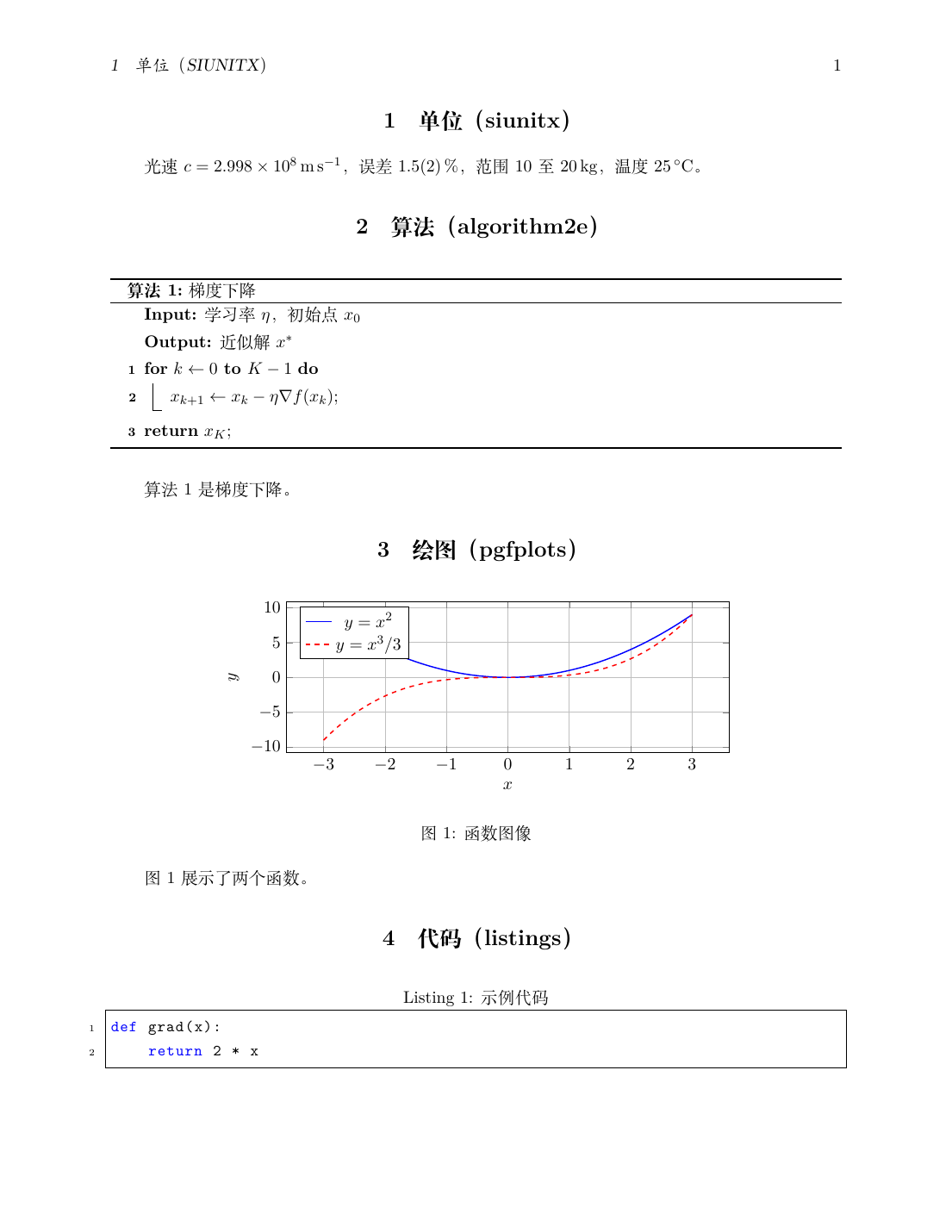
工程建议:数据图优先在 Python(matplotlib)里画好导出 PDF 矢量图再 \includegraphics 引入。pgfplots 的优势是字体与全文统一、可复现,但复杂图形编译很慢。
8.6 单位与数值:siunitx
\usepackage{siunitx}
\sisetup{range-phrase={\text{~至~}}, range-units=single}   % 中文范围词

光速 $c=\SI{2.998e8}{\metre\per\second}$,误差 \SI{1.5(2)}{\percent},
范围 \SIrange{10}{20}{\kilo\gram},温度 \SI{25}{\celsius}。
论文里数字与单位之间不要手打空格,一律交给 siunitx,能自动处理字体、间距和小数点对齐。
8.7 代码与伪代码:listings
\usepackage{listings}
\lstset{
  basicstyle=\ttfamily\small, breaklines=true, frame=single,
  numbers=left, numberstyle=\tiny,
  keywordstyle=\color{blue}, commentstyle=\color{gray}
}
\renewcommand{\lstlistingname}{代码}   % 中文化 "Listing"

\begin{lstlisting}[language=Python,caption={示例代码},label={lst:code}]
def grad(x):
    return 2 * x
\end{lstlisting}
8.8 图表相关的坑
9. 参考文献
9.1 两条路线
结论:新项目用 biblatex + biber;只有期刊强制提供 .bst 时才退回 natbib + bibtex。
9.2 最小可用示例
refs.bib:
@article{lecun2015deep,
  author  = {LeCun, Yann and Bengio, Yoshua and Hinton, Geoffrey},
  title   = {Deep learning},
  journal = {Nature},
  volume  = {521},
  number  = {7553},
  pages   = {436--444},
  year    = {2015},
  doi     = {10.1038/nature14539}
}
@inproceedings{vaswani2017attention,
  author    = {Vaswani, Ashish and Shazeer, Noam and Parmar, Niki and others},
  title     = {Attention is All You Need},
  booktitle = {Advances in Neural Information Processing Systems},
  volume    = {30},
  pages     = {5998--6008},
  year      = {2017}
}
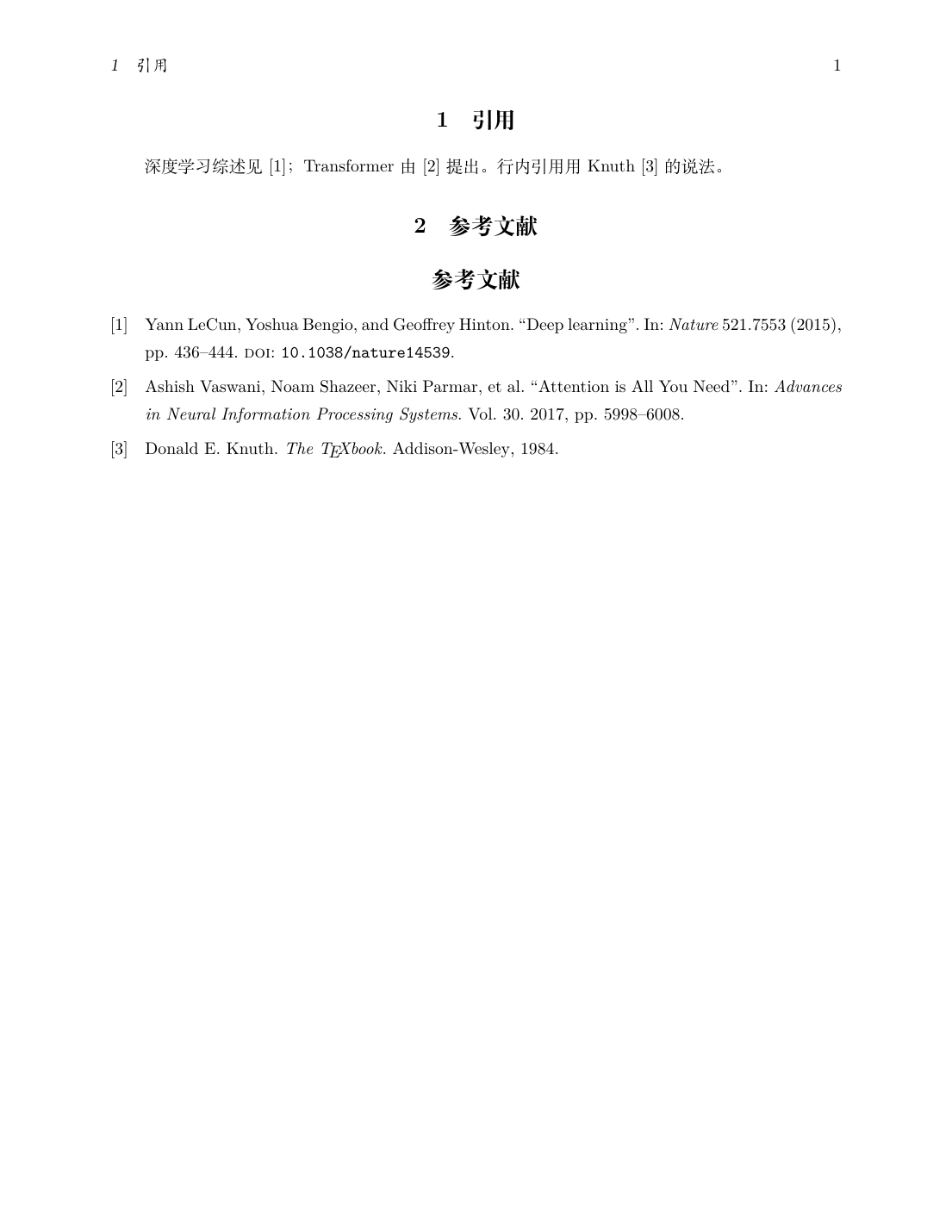
主文档:
\documentclass[UTF8,11pt]{ctexart}
\usepackage[backend=biber,style=numeric,sorting=none]{biblatex}
\addbibresource{refs.bib}

\begin{document}
深度学习综述见 \cite{lecun2015deep};Transformer 由 \cite{vaswani2017attention} 提出。
行内引用用 \textcite{lecun2015deep} 的说法。

\printbibliography[title={参考文献}]
\end{document}
latexmk -xelatex 05-bib.tex # 一条命令跑完 latex→biber→latex→latex
实测输出:
9.3 常用 style
加 natbib=true 后仍可用 \citet / \citep 命令,便于从老文档迁移。
9.4 Zotero → Better BibTeX(强烈推荐)
手工维护 .bib 很痛苦。标准做法:
- 安装 Zotero 插件 Better BibTeX(retorque.re/zotero-better-bibtex);
- 右键某个 collection → Export Collection…;
- 格式选 Better BibLaTeX(配 biblatex)或 Better BibTeX(配 natbib)——两者不可互换,前者输出
date,后者输出 year/month;
- 勾选 Keep updated,导出为
.bib 文件后由 Zotero 自动维护;
- 在
.tex 里 \addbibresource{refs.bib} 指向该文件。
注意:\addbibresource 要写完整文件名(含 .bib),而老式的 \bibliography{refs} 不写扩展名。
9.5 参考文献的坑
本机实测的错误提示(没跑 biber 时):
Package biblatex Warning: Please (re)run Biber on the file:
(biblatex)                08-nobiber
(biblatex)                and rerun LaTeX afterwards.
10. 科研写作工作流
10.1 项目目录组织
推荐一个可长期维护的结构:
paper/
├── main.tex                # 主文件,只管 \input 与全局设置
├── preamble.tex            # 导言区:宏包与自定义命令
├── sections/
│   ├── 01-intro.tex
│   ├── 02-method.tex
│   ├── 03-experiment.tex
│   └── 04-conclusion.tex
├── figures/                # 图片(建议 .pdf 矢量图)
├── refs.bib                # Zotero 自动导出
├── .gitignore              # 忽略编译中间文件
└── .latexmkrc              # latexmk 配置
main.tex 里用 \input 组装:
\input{preamble}
\begin{document}
\maketitle
\input{sections/01-intro}
\input{sections/02-method}
\input{sections/03-experiment}
\input{sections/04-conclusion}
\printbibliography
\end{document}
好处:单个文件不会长到卡编辑器,git diff 也更有意义。
10.2 git 版本管理论文
.gitignore:
# 编译中间产物
*.aux
*.log
*.out
*.toc
*.lof
*.lot
*.bbl
*.blg
*.bcf
*.run.xml
*.fls
*.fdb_latexmk
*.synctex.gz
*.xdv

# 产物(视需要决定是否提交)
# *.pdf

# 编辑器
.vscode/
.idea/
建议不要提交 .pdf,让 CI 或本地每次重新生成;如果期刊需要,再单独归档。
10.3 latexdiff:生成修改稿
投稿返修时,期刊通常要求"标注修改处"。latexdiff 能对比两个版本自动生成修订标记:
latexdiff old.tex new.tex > diff.tex
latexmk -xelatex diff.tex
输出的 PDF 里新增内容带下划线、删除内容带删除线,省去手工标注。
10.4 完整论文模板
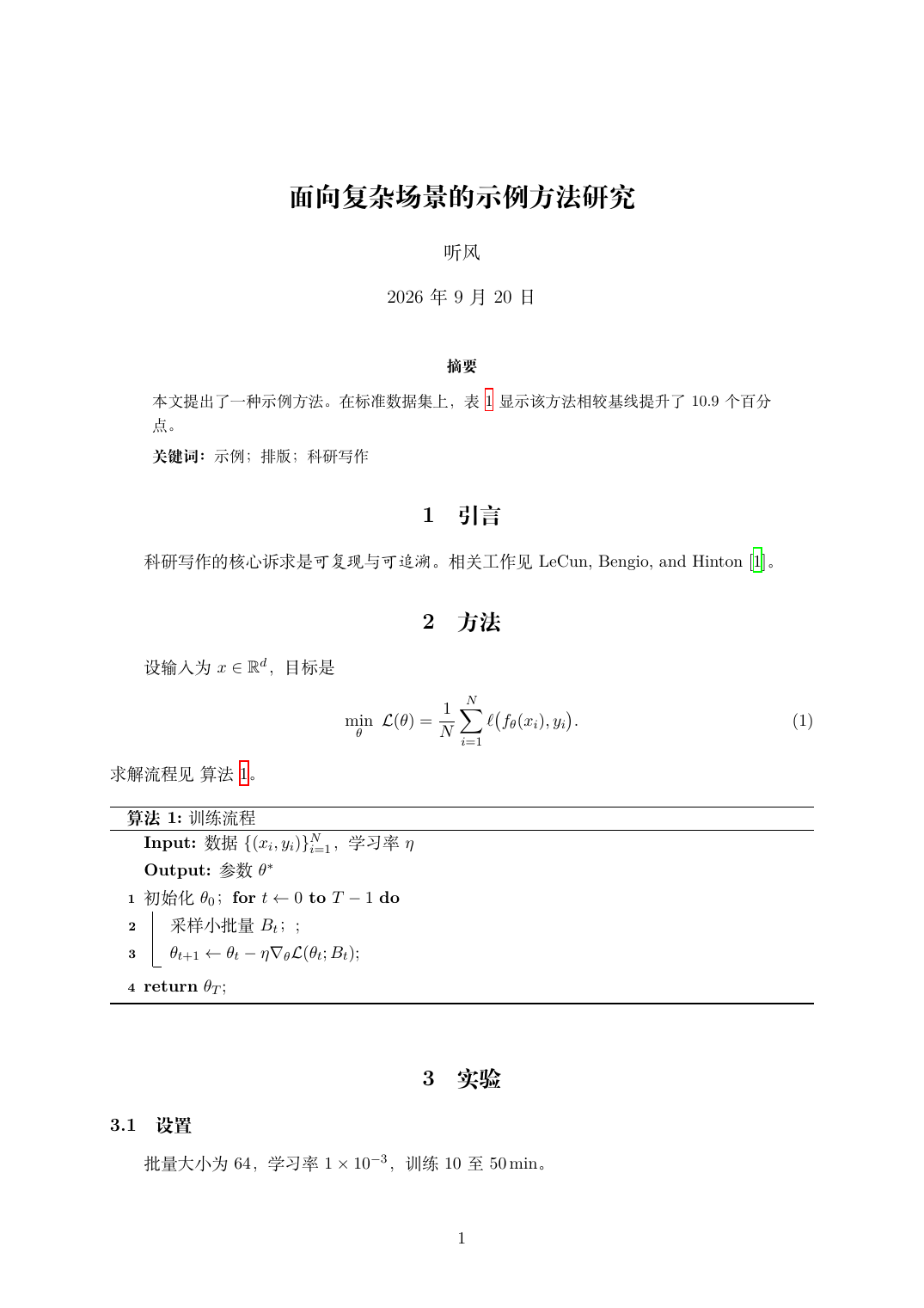
下面是一份经过本机编译验证的骨架,涵盖论文的全部常见组件:
\documentclass[UTF8,11pt,a4paper]{ctexart}

% ---------- 页面 ----------
\usepackage{geometry}
\geometry{left=2.5cm,right=2.5cm,top=2.5cm,bottom=2.5cm}

% ---------- 数学 ----------
\usepackage{amsmath,amssymb,mathtools,bm}

% ---------- 图表 ----------
\usepackage{graphicx}
\usepackage{subcaption}
\usepackage{booktabs}
\usepackage{multirow}
\usepackage{siunitx}

% ---------- 算法 ----------
\usepackage[ruled,vlined,linesnumbered]{algorithm2e}

% ---------- 文献 ----------
\usepackage[backend=biber,style=numeric,sorting=none]{biblatex}
\addbibresource{refs.bib}

% ---------- 引用与链接(必须放最后)----------
\usepackage{hyperref}
\usepackage{cleveref}

% ---------- 中文名称定制 ----------
\sisetup{range-phrase={\text{~至~}}, range-units=single}
\crefname{equation}{式}{式}       \Crefname{equation}{式}{式}
\crefname{figure}{图}{图}         \Crefname{figure}{图}{图}
\crefname{table}{表}{表}          \Crefname{table}{表}{表}
\crefname{algorithm}{算法}{算法}  \Crefname{algorithm}{算法}{算法}
\SetAlgorithmName{算法}{算法}{算法列表}

\title{\bfseries 面向复杂场景的示例方法研究}
\author{听风}
\date{\today}

\begin{document}
\maketitle

\begin{abstract}
\noindent 本文提出了一种示例方法。在标准数据集上,\cref{tab:main} 显示该方法相较基线提升了 10.9 个百分点。
\par\vspace{1ex}
\noindent\textbf{关键词:} 示例;排版;科研写作
\end{abstract}

\section{引言}\label{sec:intro}
科研写作的核心诉求是\emph{可复现}与\emph{可追溯}。相关工作见 \textcite{lecun2015deep}。

\section{方法}\label{sec:method}
\begin{equation}\label{eq:obj}
  \min_{\theta}\ \mathcal{L}(\theta)=\frac{1}{N}\sum_{i=1}^{N}\ell\bigl(f_\theta(x_i),y_i\bigr).
\end{equation}

\section{实验}\label{sec:exp}
\begin{table}[htbp]
  \centering
  \caption{主实验结果}\label{tab:main}
  \begin{tabular}{lS[table-format=2.1]S[table-format=2.1]}
    \toprule
    方法 & {准确率 (\%)} & {耗时 (s)} \\
    \midrule
    基线            & 82.3 & 12.5 \\
    本文 (w/o 模块) & 88.1 & 13.2 \\
    \textbf{本文}   & \bfseries 93.2 & \bfseries 13.8 \\
    \bottomrule
  \end{tabular}
\end{table}

\section{结论}\label{sec:conclusion}
目标函数见 \cref{eq:obj},主结果见 \cref{tab:main}。

\printbibliography[title={参考文献}]
\end{document}
实测输出(第一页):
10.5 期刊 / 会议模板去哪找
选模板的原则:以期刊官方提供的 .cls 为准,不要用第三方改版。\documentclass 一换,多数宏包仍可用,但 booktabs、siunitx 等有时会被模板限制。
11. 工程实践与排错
11.1 latexmk:唯一需要记的编译工具
latexmk -xelatex main.tex          # 首选:中文/Unicode,自动跑 biber
latexmk -pdf main.tex              # 纯英文,pdflatex
latexmk -lualatex main.tex         # LuaLaTeX
latexmk -pvc -xelatex main.tex     # 持续监视,保存即重编译(preview continuously)
latexmk -c                         # 清理中间文件(保留 PDF)
latexmk -C                         # 连 PDF 一起清理
.latexmkrc(放在项目根目录,latexmk 自动读取):
$xelatex = 'xelatex -synctex=1 -interaction=nonstopmode -file-line-error %O %S';
$pdf_mode = 5;          # 5 = 使用 $xelatex
$out_dir = 'build';     # 中间文件与 PDF 都放 build/(可选)
11.2 SyncTeX:从 PDF 跳回源码
latexmk -xelatex -synctex=1 main.tex
- 正向(源码 → PDF):编辑器里按
Ctrl+Alt+J(VS Code);
- 反向(PDF → 源码):在 PDF 阅读器里
Ctrl+单击。
要求:
- 编译时必须带
-synctex=1,且不能删 .synctex.gz;
- 阅读器必须支持 SyncTeX:Zathura/Okular(Linux)、Skim(macOS)、SumatraPDF(Windows)。
11.3 VS Code 常用入口
11.4 真实报错速查(本机实测输出)
排查顺序(照这个走能解决九成问题):
- 只处理第一个
!,后面的错误往往是它引发的连锁反应;
- 看
l.NN 定位到源码行;
- 翻
.log 搜索该行上下文;.log 才是完整日志(终端输出是截断的);
- 二分法:把
\input 的章节逐个注释,缩小范围;
- 用
\listfiles 打印所有宏包版本,怀疑版本冲突时排查。
11.5 调试技巧
\listfiles                    % 导言区:打印全部宏包及版本到 .log
\usepackage[draft]{graphicx}  % 只画图片边框,不加载图片(加速编译)
pdflatex -interaction=nonstopmode -file-line-error main.tex   # 不停下来等输入
pdflatex -draftmode main.tex                                  # 只排版不出 PDF(最快)
11.6 Arch 专属注意
- 不要
tlmgr update:TeX Live 由 pacman 管理,用 pacman -Syu 更新;
- 报"文件不属于任何包"时:
pacman -Qo /usr/share/texmf-dist/... 查归属,多半是误用了 tlmgr;
- 字体缓存问题:
fc-cache -fv(改过系统字体后)。
12. 速查表
最该形成肌肉记忆的
常用宏包加载顺序(骨架)
\documentclass[UTF8,11pt,a4paper]{ctexart}
\usepackage{geometry}                        % 页面
\usepackage{amsmath,amssymb,mathtools,bm}    % 数学
\usepackage{graphicx,subcaption,booktabs}    % 图表
\usepackage{siunitx}                         % 单位
\usepackage[ruled,vlined,linesnumbered]{algorithm2e}
\usepackage[backend=biber,style=numeric]{biblatex}
\addbibresource{refs.bib}
\usepackage{hyperref}                        % ← 最后
\usepackage{cleveref}                        % ← hyperref 之后
\begin{document}
最常用的十组命令
\section{}  \label{}  \ref{}  \cref{}  \eqref{}
\begin{equation}...\end{equation}
\begin{align}...\end{align}
\begin{figure}...\caption{}...\end{figure}
\begin{table}...\toprule...\midrule...\bottomrule...\end{table}
\cite{}  \textcite{}  \printbibliography
\includegraphics[width=0.8\linewidth]{x}
\SI{25}{\celsius}   \num{12345}
13. 参考链接
官方文档
入门读物
本手册涉及的宏包(CTAN 官方页)
本机验证环境
TeX Live 2026 (Arch, 2026.1-1)  |  LaTeX2e <2025-11-01>  |  ctexart 2022
pdfTeX 1.40.29  XeTeX 0.999998  LuaTeX 1.24.0
biblatex 2025  biber 2.22  latexmk 4.87
配图来源
images/latex-project-logo.svg:The LaTeX Project 官方 logo(https://www.latex-project.org/),用于标识本手册主题,版权归 The LaTeX Project 所有。images/output-*.png:本机用 XeLaTeX 真实编译后经 pdftoppm 渲染的输出截图,非转载;对应的 .tex 源码即本文档中的示例。